I am a newbie setting up a DXP 2800. I have 2 WD NAS drives set up in raid 1 for all my files backup. I have a 4TB SSD that I have set up with ROON using Docker. The problem I am having is adding file names to the raid drives. I can do it on the ssd easily. I have watched several youtube videos and searched the web. I even emailed UGREEN with no help. I wonder if I should start the setup over and get the raid running first and then add the ssd in non raid.
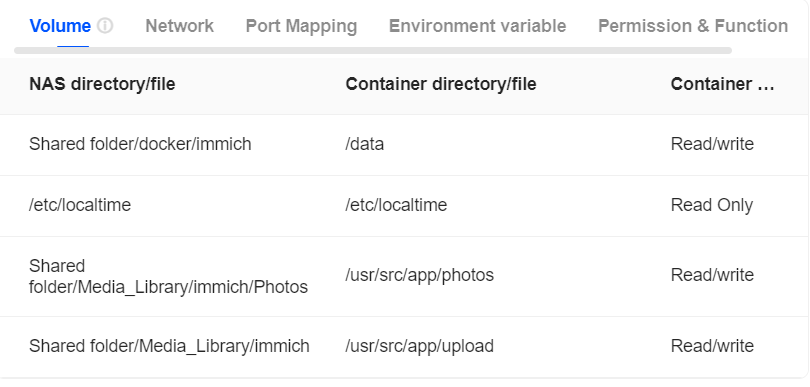
You’re aware that you have to set pointers in Docker to your RAID drives, right?
Otherwise the Docker program won’t know how to access the drives.
Below is an example from my Immich container. You’ll have to read up on the specific container to see what the container directory/file is, whereas the NAS directory/file is up to you to point to the location where you want the data to be or where it already is located.
Roon user here, also. I don’t know if this would work in your case, but you might need to create a separate volume for the NVMe drives, and install ROON to that location.
I posted my compose file below, if it helps. Note the location of my ROON install is /docker/roon, but the location for my music is /Media/Music for my various FLAC and other files.