HI 
share you my simple way to root (temporary until restart or shutdown) your NAS using mobile (android ) only
TESTED : dxp 4800 plus 
your NAS and mobile should be connected to same network 
root.sh code:
#!/bin/bash

# Configuration
NAS_IP="YOUR NAS IP"
ROOT_USER="root"
ROOT_PASS="ROOT PASSWORD"
ADMIN_USER="YOUR ADMIN USER OF NAS"
LOG_FILE="$(pwd)/nas_root_log.txt"

# Force Termux paths into the environment
TERMUX_BIN="/data/data/com.termux/files/usr/bin"
export PATH="$PATH:$TERMUX_BIN"

# Logging function: file-location-result
log_action() {
    local message="$1"
    local status="${2:-INFO}"
    local timestamp=$(date "+%Y-%m-%d %H:%M:%S")
    local log_entry="[$timestamp] [$status] File: root.sh | Location: $(pwd) | Result: $message"
    echo -e "$log_entry"
    echo "$log_entry" >> "$LOG_FILE"
}

# Dependency Check & Auto-Install
check_dependencies() {
    echo -e "\e[1;34m[*] Checking system dependencies...\e[0m"
    local pkgs=("openssh" "sshpass" "coreutils")
    local missing=()

    for pkg in "${pkgs[@]}"; do
        local cmd=$pkg
        [ "$pkg" == "openssh" ] && cmd="ssh"
        [ "$pkg" == "coreutils" ] && cmd="sleep"

        if ! type -P "$cmd" &> /dev/null && [ ! -f "$TERMUX_BIN/$cmd" ]; then
            missing+=("$pkg")
        fi
    done

    if [ ${#missing[@]} -gt 0 ]; then
        log_action "Missing: ${missing[*]}. Attempting install..." "WARNING"
        pkg update -y
        pkg install "${missing[@]}" -y
    fi

    log_action "Dependencies verified." "SUCCESS"
    echo -e "\e[1;32m[✓] All dependencies satisfied.\e[0m"
}

# 1. Root Injection
enable_root() {
    log_action "Starting Root Enablement (Injection)..." "TASK"

    echo -e "\n\e[1;33m[!] Login required as Admin ($ADMIN_USER) to inject root payload.\e[0m"
    read -s -p "Enter Password for $ADMIN_USER: " admin_pass
    echo -e "\n"

    local SSHPASS_BIN=$(type -P sshpass)
    [ -z "$SSHPASS_BIN" ] && SSHPASS_BIN="$TERMUX_BIN/sshpass"

    # The new robust payload:
    # 1. Native chpasswd hashing
    # 2. Force PermitRootLogin yes
    # 3. Force PasswordAuthentication yes
    # 4. Restart ssh or sshd
    local payload="echo 'root:$ROOT_PASS' | chpasswd && \
    sed -i 's/^#*PermitRootLogin.*/PermitRootLogin yes/' /etc/ssh/sshd_config && \
    grep -q '^PermitRootLogin yes' /etc/ssh/sshd_config || echo 'PermitRootLogin yes' >> /etc/ssh/sshd_config && \
    sed -i 's/^#*PasswordAuthentication.*/PasswordAuthentication yes/' /etc/ssh/sshd_config && \
    grep -q '^PasswordAuthentication yes' /etc/ssh/sshd_config || echo 'PasswordAuthentication yes' >> /etc/ssh/sshd_config && \
    nohup sh -c 'sleep 2 && (systemctl restart ssh || systemctl restart sshd)' >/dev/null 2>&1 &"

    local remote_cmd="echo \"$admin_pass\" | sudo -S sh -c \"$payload\""

    log_action "Attempting SSH connection and executing native root payload..." "INFO"

    # Execute payload
    "$SSHPASS_BIN" -p "$admin_pass" ssh -o LogLevel=ERROR -o StrictHostKeyChecking=no "$ADMIN_USER@$NAS_IP" "$remote_cmd" 2>>"$LOG_FILE"

    log_action "Payload sent. Waiting 3 seconds for NAS SSH daemon to restart..." "SUCCESS"
    echo -e "\e[1;32m[✓] Payload delivered. The NAS is restarting its SSH service now...\e[0m"
    sleep 3
}

# 2. Check Root Status
check_root() {
    log_action "Verifying root status (UID check)..." "TASK"

    local SSHPASS_BIN=$(type -P sshpass)
    [ -z "$SSHPASS_BIN" ] && SSHPASS_BIN="$TERMUX_BIN/sshpass"

    # Attempt to login as root and get UID
    local result=$("$SSHPASS_BIN" -p "$ROOT_PASS" ssh -o LogLevel=ERROR -o ConnectTimeout=5 -o StrictHostKeyChecking=no "$ROOT_USER@$NAS_IP" "id -u" 2>>"$LOG_FILE")

    if [ "$result" == "0" ]; then
        log_action "STATUS: ROOTED (UID: 0)" "SUCCESS"
        echo -e "\n\e[1;32m[✓] STATUS: SUCCESS - THE NAS IS FULLY ROOTED by KBJ911\e[0m"
    else
        log_action "STATUS: NOT ROOTED" "FAIL"
        echo -e "\n\e[1;31m[!] STATUS: FAILED - Access Denied or Non-Root UID Detected.\e[0m"
    fi
}

# Main Menu
show_menu() {
    check_dependencies
    while true; do
        echo -e "\n\e[1;34m━━━━━━━━━━━━━━━━━━━━━━━━━━━━━━━━━━━━━━━━━━━━━━━━━━━━━━━━━━━━━━\e[0m"
        echo -e "\e[1;37m  UGREEN NAS ROOT by KBJ911 using Termux \e[0m"
        echo -e "\e[1;34m━━━━━━━━━━━━━━━━━━━━━━━━━━━━━━━━━━━━━━━━━━━━━━━━━━━━━━━━━━━━━━\e[0m"
        echo " [1] Root (Enable Root Access)"
        echo " [2] Check Root (Verify Status)"
        echo " [3] Exit"
        echo -e "\e[1;34m━━━━━━━━━━━━━━━━━━━━━━━━━━━━━━━━━━━━━━━━━━━━━━━━━━━━━━━━━━━━━━\e[0m"
        read -p " Select an option [1-3]: " choice

        case $choice in
            1) enable_root ;;
            2) check_root ;;
            3) log_action "User closed script" "INFO"; exit 0 ;;
            *) echo -e "\e[1;31mInvalid option.\e[0m" ;;
        esac
    done
}

show_menu
**save the code to a file named: root.sh
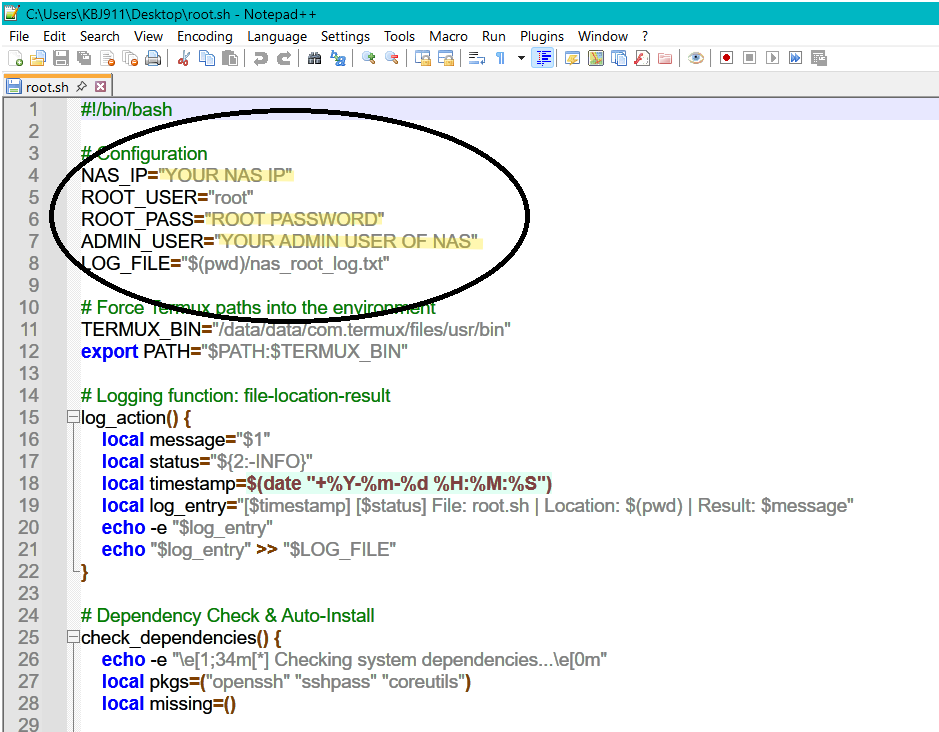
YOU MUST CHANGE AS IN PICTURE AS YOUR CONFIG
NEXT :
-
-
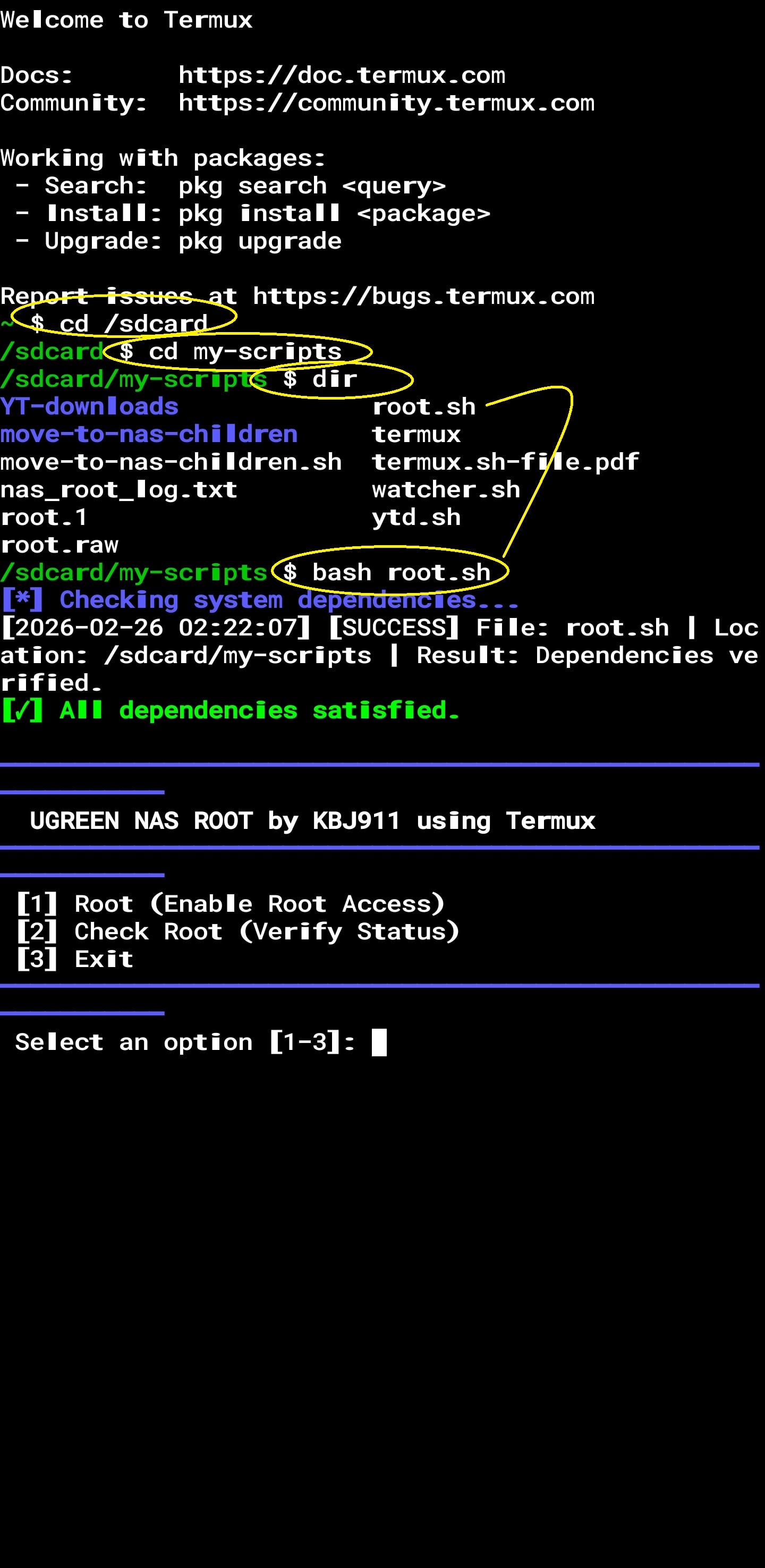
open TERMUX app
-
goto the dir where you put the root.sh file
-
write : bash root.sh
-
it will install dependencies then shows the options
-
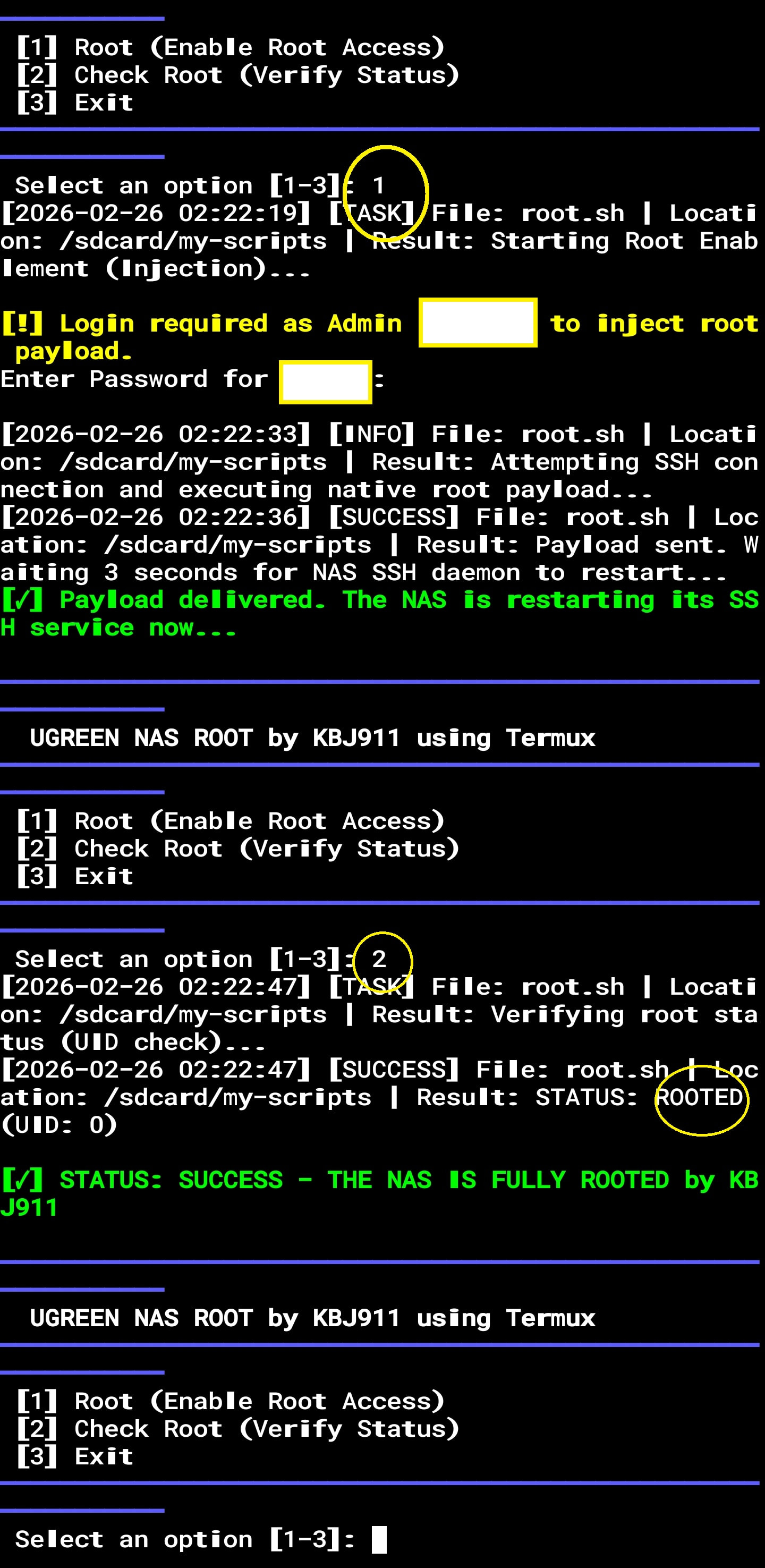
it will ask you to put admin password
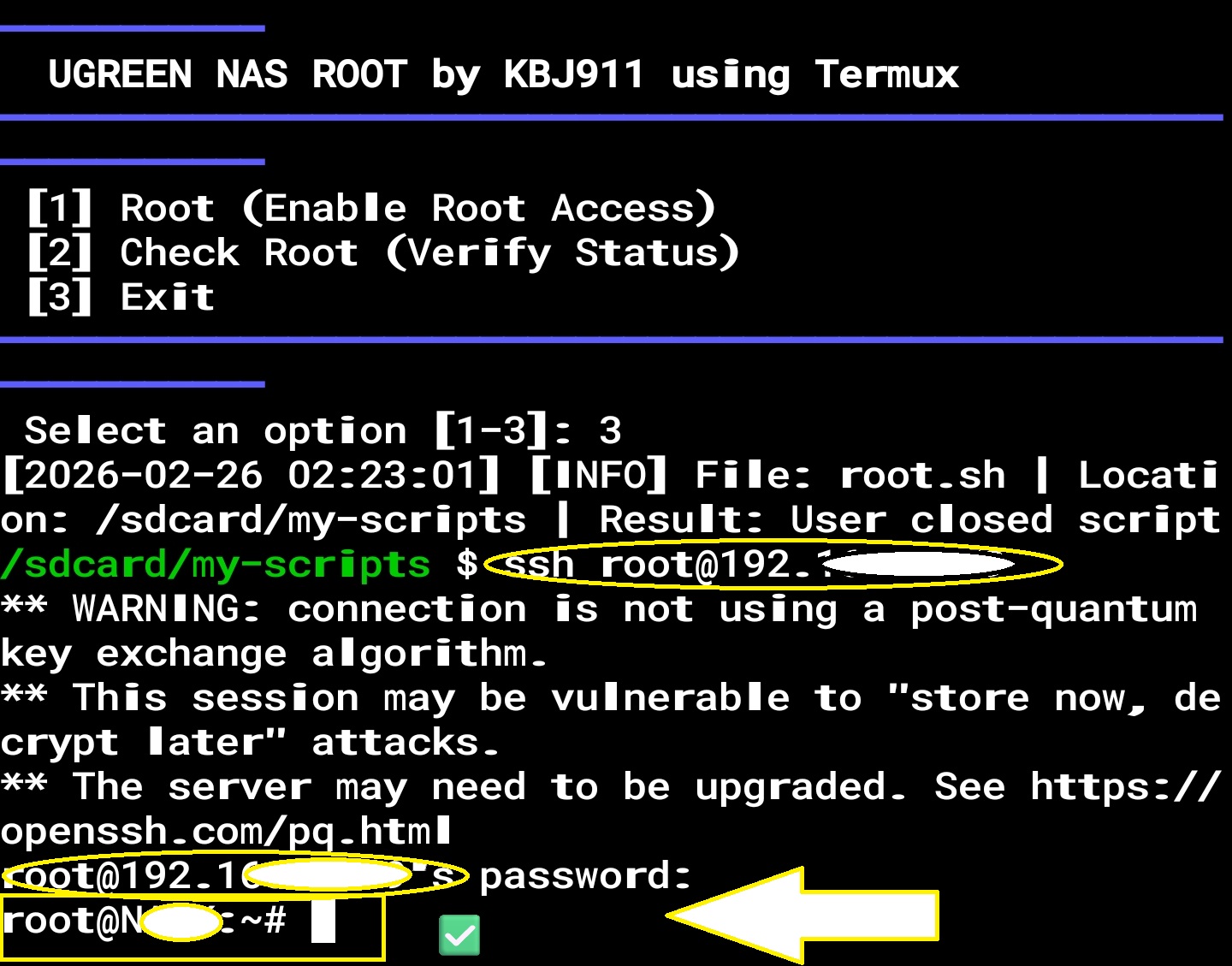
so anytime you need root : just do 1,2 and 3
-