Due to the Synology HDD lockdown, I have started to move to UGREEN, and must say I am completely underwhelmed by it. There are a lot of fairly major UI issues, and some of the fairly basic things don’t work.
In any case, I am here now, so I wanted to copy my data over.
I have rysnc service enabled on my Synology, and a windows test shows connection successful on port 873.
If I try to connect to the synology from the sync and backup app, the connection times out, it can’t find anything.
If I enable rsync on UGREEN, and try to connect from Synology using hypervault, it just constantly says the authentication failed, and that the module doesn’t exist.
I’ve used rsync on linux for 20 years, and never had these problems. It’s now down to a manual copy user windows explorer, which is very frustrating…
If you don’t like the Ugreen OS, you can install an alternative OS. I’ve tried OMV and apparently TerraMaster’s OS works just fine, assuming you can get hold of it somewhere.
Unlike Synology and QNAP devices, the hardware isn’t locked down, so you can install whatever OS you want on an SSD.
From what I can tell on the instructions in UGOS, at the moment Rsync only works between Ugreen NAS devices, but it might be possible to bypass that via the command line?
You’re not wrong in that the platform is lacking in terms of features compared to Synology, but for how long have Synology been making NAS devices vs. Ugreen? Did you really expect feature parity? If so, I believe you bought the wrong product and should consider QNAP, as it’s the only NAS maker out there that will offer you some kind of feature parity. Asustor, TerraMaster and the others, will not be anywhere near what you’re used to.
It does as I mentioned above, but I only have an option to use it with another Ugreen NAS, but it seems like you have to use the backup, not the sync option to use it with non Ugreen hardware.
The page is in English, but for some reason it always shows up in chinese when you link to their site.
Synology has developed corporate level features, which can be far too complex for home users. I thought Ugreen would have a simple working NAS solution.
However UGreen has no working rsync (sync and backup has a setting to connect to a backup rsync server, that doesn’t work)
I will have to copy files using windows, which is a right royal and slow pain….
And…. doesn’t work - however I will raise a new post for that, as not related to rsync.
Keep in mind that this is an unofficial forum, so if you want Ugreen to do anything about your issues, you might want to try contacting their support, rather than post it here.
Personally, I have never used rsync, but I know a lot of people use it and I was going to try and use it to copy the data over from my old NAS, but as it didn’t seem to be an option, I ended up using TeraCopy in Windows, which wasn’t ideal.
An option that might work, would be to mount a network folder in the file manager and copy the files over that way.
Hi ! I am syncing with rsync from my qnap to ugreen, and that is no problems. I can try from some synology also if you want, but i cannot see the problem with it. There is rsync on all 3 nases. Ugreen is soooo far away from qnap and synology about functions and fun stuff to have in a nas, but hopefully they are working on it. Maybee you have some missing port settings and portforwarding.
Just to close this down, I never got it to work, neither did UGREEN, they suggested also to mount the network drive and copy like that, instead of using Rsync. So, rsync really only supported between ugreen devices. Not very good, however it is what it is I suppose.
This plus the totally awful level of user level file access control (basically doesn’t even function as a NAS in this regard) do make me regret buying this device.
Did you try contacting Synology and ask them why it doesn’t work, as someone clearly got it working with QNAP and Ugreen, suggesting it might be a Synology issue?
Also, you have the option to install a third party OS on your Ugreen NAS if you don’t like UGOS, as mentioned above.
I have used rsync to copy all my data from my old Synolofy NAS to my new UGreen NAS.
It worked flawlessly but required a little bit of tinkering to make it work.
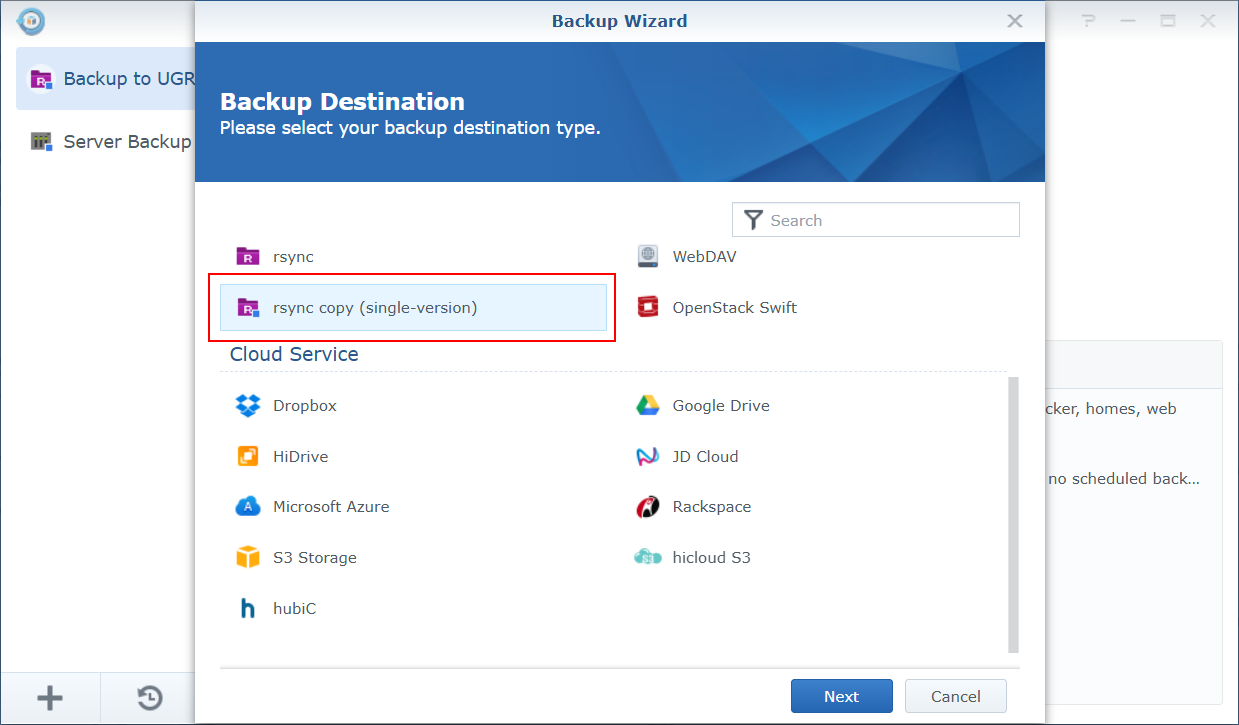
Make sure you use “rsync copy (single version)” on the synology side and it should work.
I could not make it work with the regular “rsync”.