The easy way to enable hardware acceleration in Jellyfin

For those that don’t love digging around and finding where to edit things, this is a much quicker way to add hardware acceleration in Jellyfin. This seems to require that you have Portainer though, as I can’t find anywhere in Docker to do this.

Under Runtime & resources in the Jellyfin container, add the following, assuming you have an Intel CPU and iGPU and hardware acceleration will be enabled.
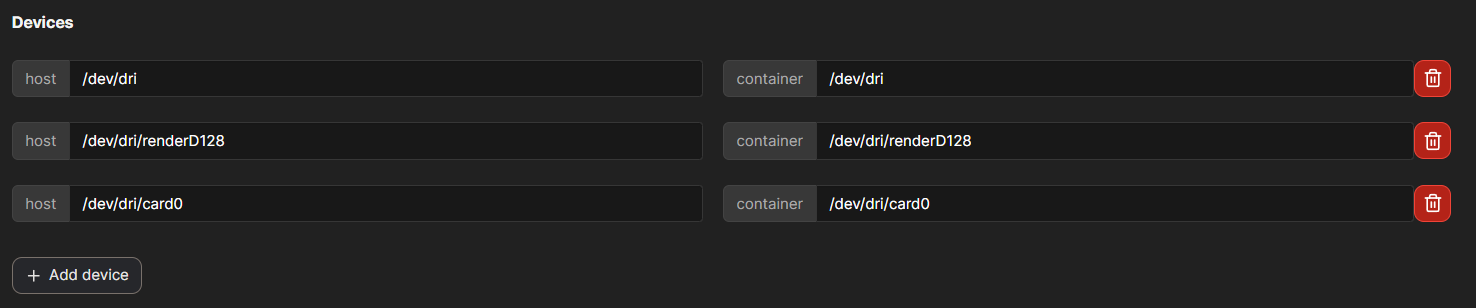
1 Like

Youre right :ok_hand:

And here I share my best setting yaml for jellyfin on dxp4800plus :

services:

jellyfin:

image: jellyfin/jellyfin:latest 

container_name: jellyfin 

restart: always 

network_mode: host 

devices: 

  - /dev/dri:/dev/dri 

  - /dev/dri/renderD128:/dev/dri/renderD128 

  - /dev/dri/card0:/dev/dri/card0 

volumes: 

  - ./jellyfin/config:/config 

  - ./jellyfin/cache:/cache 

  - /volume1/Media_K:/data 

environment: 

  - TZ=Asia/Riyadh 

  - PUID=1000 

  - PGID=10

I would use bridge rather than host for the network mode, but each to their own.