I’m trying to track down a WAN speed issue on a UGREEN NASync DXP4800 Plus running UGOS and SABnzbd in Docker.
Network setup
• ISP: gigabit fiber.
• Router: UniFi Cloud Gateway Max.
• Switch: TP‑Link unmanaged gigabit switch.
• Devices: Mac Mini (2021) and UGREEN DXP4800 Plus NAS, both wired with Cat6 into the same switch → Cloud Gateway Max.
The Mac Mini and the gateway themselves see close to full gigabit to the internet on regular speed tests.
What works
• iperf3 between the Mac Mini and the NAS is ~940 Mbit/s both ways (LAN path is solid gigabit).
• ethtool eth0 on the NAS reports Speed: 1000Mb/s , Duplex: Full , Link detected: yes .
• UGOS network panel shows LAN1 as 1 Gbps, full duplex, MTU 1500, DHCP, gateway 192.168.1.1.
• SABnzbd in Docker is configured with Eweka on SSL port 563, 18 connections, and the “Maximum line speed” in the Tuning tab set to match my tests.
The problem
• Running speedtest-cli directly on the NAS only gives about 70–100 Mbit/s down and ~40 Mbit/s up, even after reboots.
• At the same time, the Mac on the same switch consistently pulls much higher speeds to the internet.
• SABnzbd on the NAS tops out around 8–9 MB/s on large downloads, which lines up perfectly with the ~70–100 Mbit/s the NAS itself is getting.
• LAN copies between Mac and NAS are fast; only internet‑bound traffic from UGOS is slow.
So cabling, switch, and NIC all appear fine; the bottleneck seems to be UGOS → WAN rather than SAB or my Usenet provider.
What I’ve already checked
• No VPN client, no Tailscale exit‑node, nothing obvious in UGOS that looks like QoS/traffic shaping.
• UniFi shows both Mac and NAS in the same “Default” network/VLAN, no bandwidth profiles or client rate limits.
• SABnzbd server settings match provider docs (SSL on 563, host name correct, reasonable connection count).
• Rebooting UGOS sometimes nudges speedtest-cli a bit (e.g., from ~80 to ~100 Mbit/s) but it never gets anywhere close to gigabit.
Ask
• Are other DXP4800 Plus / UGOS users seeing WAN speeds stuck around 70–100 Mbit/s even though LAN iperf is gigabit?
• Has anyone confirmed that tweaking PCIe ASPM ( pcie_aspm=off in GRUB or similar) actually fixes WAN throughput on this model, and if so, exactly what did you change?
• Is there a documented UGOS setting, firmware update, or known bug related to NIC power saving / ASPM that UGREEN has acknowledged?
Have you tried swapping to the secondary network interface?
I have no issues pushing 10 Gbps on my DXP4800 Plus.
Not had any Ethernet related issues, nor have I seen any updates that mention it.
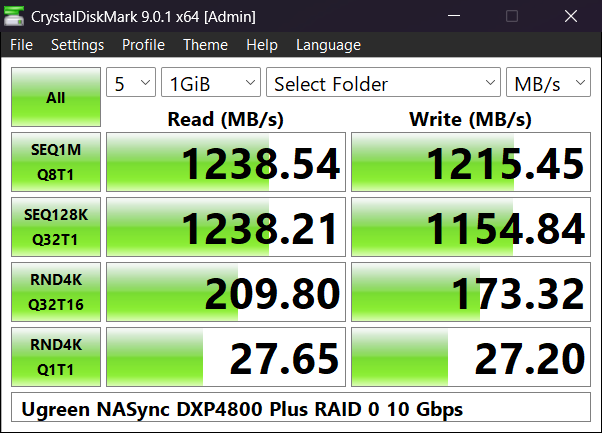
I have this issue too, but it is because my switch only has 1 Gbps ports so the link on the NAS will default to 1 Gbps. I am looking into 10 Gbps switches now to rectify that issue.
Hope that helps.