I am just setting up my new 2800, but even though on my Iphone app it says that ‘setup is complete’ and all is normal. I can.t see it in Time Machine to back up my MacBook. Can anyone help please? Pat
Things don’t just magically work, you need to configure some settings for time machine to work.
As I have a mixed network, I use Samba/SMB, but you can also use NFS.
First, you need to enable VFS in the advanced SMB settings.
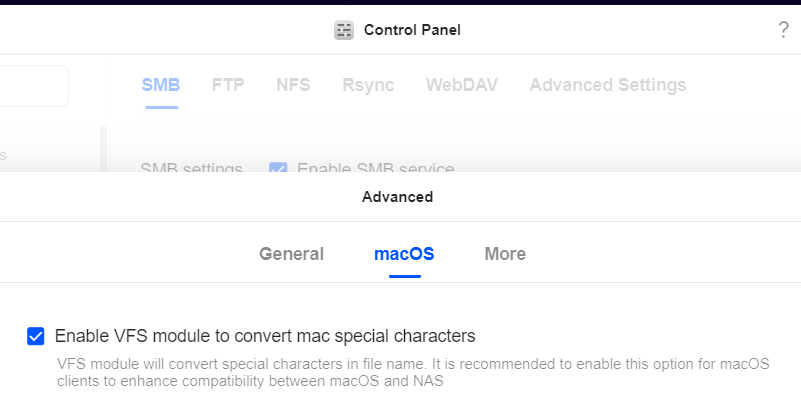
Then I’d suggest you enable wsdd2 and Bonjour under the advance settings under file services.
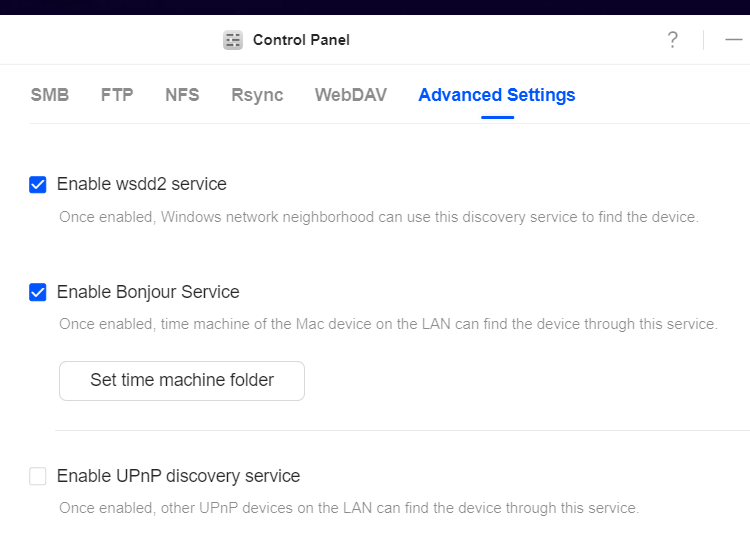
Then click on the set time machine folder button and create a shared folder for each of the backups you want to do.
Now go to user management, select each user account and give them access to their corresponding time machine backup folders.
This should now allow you to access the backup folders on your NAS by finding the shares on your network via your Mac. I don’t remember off the top of my head how I did this on my wife’s MacBook Air, but it wasn’t very hard.
Ugreen also has a guide here:
Thank you very much. I have done all that as suggested but when I go to settings/general/time machine and click the + button, I get this message ‘No available time machine destination’ (connect a nas.). Yet when I go into Control panel on the nas it says everything is OK. I can see my personal folder and when I click on it I can see photo backup from my iphonr and the backup folder I created to save backups from the mac - but never the twain shall meet. As an 84 yo, I’m totally confused. Pat
Sorry, I can’t really help you any further, as I set it up on my wife’s MacBook Air with no problem. Maybe contact Ugreen’s support, as this is an unofficial forum.