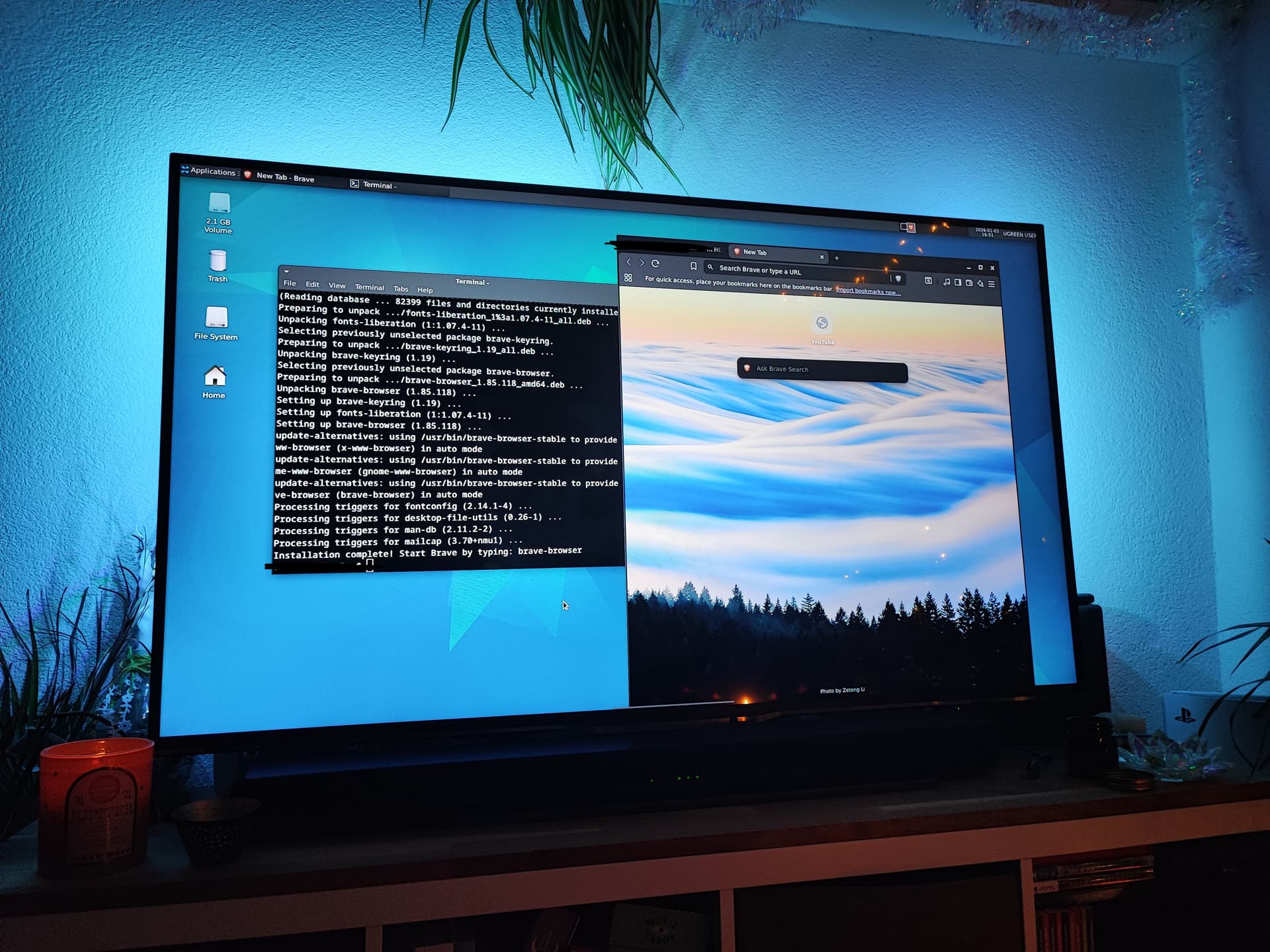
I was wondering if there are better ways to use the hdmi port of a ugreen dxp 2800. Having only the theater app through it like a waste to me.
Can I install a regular desktop environment (XFCE for example) and have it output to a connected display? That would potentially give full access to the filesystem and let us install a regular browser that does not run in a vm.
Is anyone doing something like that? Is there anything to be aware of when attempting this?
Is the hdmi port working when installing another linux os?
Exactly what I tried too. we can easily get any container we want, but the problem is that getting the output to HDMI is not easy. I have tried firefox, linux distriutions (they work on VNC but no output to HDMI). QNAP has an app called HD station that lets you use your HDMI connection, I think UGreen will have something similar soon too
Hello. Yes, tried that too, but in VM there is no option for GPU or graphics passthrough. GUI is only served over a VNC port.
If you connect a monitor to HDMI port, it shows you that the HDMI port can be used only via their mobile app. You have to open the mobile app and stream the media you want to the HDMI output. IT also says that this is in beta
Yeah, I’m aware that the HDMI can be used via the mobile app, but I haven’t tried any VMs and was just curious if that was an option. The reason for asking is that Asustor has sort of a VM based system where you can use the HDMI as a monitor output, but it’s very laggy and doesn’t work well with most things that they offer, at least not on their Nimbustor 4 Gen2 models.
You seem quite familiar with NAS platforms, you’ve been answering a lot of questions around UGREEN, and you clearly know ASUSTOR as well
I tested ASUSTOR quite some time ago, and many of their apps were essentially web shortcuts. Plex icon simply opened the Plex web interface in a browser.
I’m hoping UGREEN provides a proper browser option over HDMI. That alone would make it possible to launch web-based application, at least as a starting point.
Well, I also have a DIY NAS with OpenMediaVault on it that I have been running for over seven years and some TerraMaster hardware. Got to play around with some stuff to find what suits your needs I guess.
Since I could not find anything on the topic on the entire internet, this weekend I finally had the time to just try the most obvious (but not easiest) way
(before anything else I made a full disk backup of the internal emmc using clonezilla.. Just in case)
I ssh-ed onto the Nas from a terminal app on my laptop. From there I used sudo apt install to install xfce. It wasn’t without hickups a needed a bunch of copy pasting from/to chat gpt but in the end it worked.
Attached is a photo of full desktop xfce running on the dxp2800 on my TV.
Initially it didn’t show the cursor but that was fixable.
I am not 100% sure if the hdds go fully to sleep while the DE is running (or how to gracefully shut it off and return to the theater app cast)